EdgeAura
- 3.9
- Rating
- 1.00M
- Installs
- Free
- Price
 Analysis by App-foxy
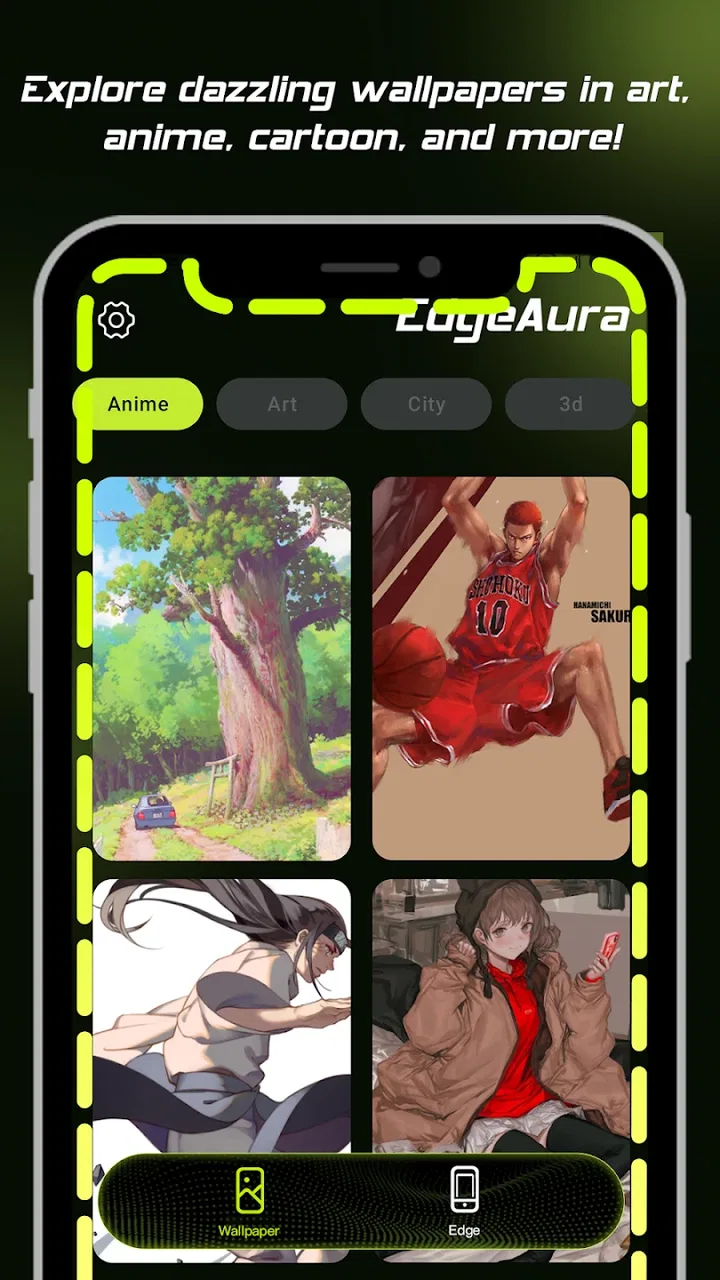
I spent time with EdgeAura as a personalization app, focusing less on the initial visual effect and more on what it feels like to use when the phone is part of everyday life. Its main idea is straightforward: add glowing edge effects, customize wallpapers, and give the caller screen a more distinctive appearance. That makes it appealing if you want your phone to feel less like a default Android device without replacing the launcher or rebuilding the entire interface.
The app is developed by Zachary Holt and is free to install, with optional in-app purchases ranging from $1.99 to $24.99 per item. It is rated for Everyone, which fits the accessible nature of its customization tools. At the time of my review, it was on version 1.26.30 and required Android 8.0 or later. The app has passed the million-install mark and holds an average rating of 4.0 from around 2.1K ratings, so it has attracted a sizeable audience while still leaving room for mixed experiences.
How EdgeAura fits into everyday personalization
What I like about this app is that it targets the parts of the phone I actually look at repeatedly. A wallpaper is visible when I unlock the device, but an edge effect can make notifications, incoming calls, or the screen itself feel more recognizable at a glance. The caller-screen angle is especially useful for people who want a stronger visual cue when the phone rings, rather than relying only on a ringtone or vibration.
You May Also Like

 Blood Strike: 2.5 Anniversary
Blood Strike’s Loadouts Turn Every Drop Into a Tactical Gamble
A close look at Blood Strike’s custom loadouts: how fast access to signature weapons reshapes its battle royale rhythm, rewards preparation, and narrows the gap between fights.

 Pandora - Music & Podcasts
Pandora’s Music Is Easy to Start, but Harder to Recover
Pandora’s strength is its low-effort path from a seed to a station. Its weak spot is how much confidence it asks you to place in connection, setup, and quiet recovery.

 8 Ball Pool
 Is Built on Rivalries, Rematches, and Routine
A close look at the rivalries, rematches, shared routines, and unanswered safety questions that turn a quick pool match into a persistent mobile community.

 Samsung Music
’s Quiet Strength Is Playing What You Already Own
Its reach comes less from spectacle than from dependable access to a personal library. That simplicity is both the app’s strongest retention engine and its ceiling.

 AccuWeather: Weather Radar
AccuWeather Review: A Quick, Clear Forecast for Everyday Decisions
For everyday plans, the best forecast is the one you can understand quickly. AccuWeather makes rain timing, radar, and local conditions easy to act on, with a few trade-offs.

 Hill Climb Racing
Why Hill Climb Racing Still Turns Crashes Into One More Run
A tiny car, a bumpy hill and one more upgrade: Hill Climb Racing keeps resurfacing because its simple chaos makes every near-miss feel personal.
More From Our News Desk



That focus also keeps EdgeAura easier to approach than a full launcher replacement. A launcher can alter icons, gestures, app drawers, widgets, and home-screen behavior, but it also demands more time and can interfere with habits built into the phone. EdgeAura is better suited to someone who wants a decorative layer while keeping the familiar Android layout underneath.
My first recommendation is to begin with restraint. A bright effect around every edge can look exciting for a few minutes and then become tiring, particularly in a dark room. A thinner or less intense style usually feels more usable for daily notifications. I would also choose a wallpaper with enough empty space for the glow to remain visible; a busy image can make both the background and the edge animation compete for attention.
The strongest everyday scenario
Imagine leaving the phone on a desk while working or cooking. Instead of picking it up every time the screen lights, a visible edge treatment can make an incoming alert easier to notice from the side. That does not replace checking the notification itself, and I would not treat it as a reliable accessibility aid, but it can provide a quick visual signal when the phone is within sight.
The same idea works for a caller screen. If you often miss calls because your phone is on silent, a customized visual presentation may make the incoming call feel more obvious. The practical benefit depends on how the effect behaves on your particular device and how much attention you give the screen, so I see it as a convenience rather than a guarantee that every call will be noticed.
For a family member who is less comfortable with complicated customization, the app can be easier to explain than a collection of separate wallpaper, icon, launcher, and call-screen tools. The trade-off is that the person still needs to understand which visual choices affect the phone and which are simply decorative. I would set it up together rather than changing everything at once.
What the visual customization does well
EdgeAura’s appeal comes from combining several related touches instead of treating the wallpaper as the entire personalization experience. The glowing border gives the phone a signature look, while wallpapers provide the color foundation and the caller screen carries that style into an interaction many personalization apps ignore.
That combination creates a useful workflow: choose the background first, then select an edge treatment that complements its dominant color, and only afterward decide whether the caller screen should match or deliberately contrast. Starting with the glow tends to produce a more artificial result because the border becomes the loudest part of the design.
A less obvious advantage is consistency. If you change wallpapers frequently, a matching edge style can make those changes feel intentional instead of leaving the phone with unrelated visual layers. I found that selecting one restrained effect and reusing it across different backgrounds produced a more coherent result than constantly switching effects.
There is also a practical reason to keep the design simple: visual personalization is something you see many times a day. A style that looks impressive in a preview may become distracting when it appears during ordinary tasks such as reading, messaging, or checking the time. I would judge an option after using it for a full day, not just after the first impression.
Controls, choices, and trust while setting it up
When I review an app that changes visible parts of the phone, I pay attention to user choice. The important question is not only whether the result looks good, but whether I can decide when and where that result appears. EdgeAura is most comfortable when treated as an optional visual layer rather than something that should dominate the device.
I recommend making one change at a time and checking the phone in several situations: on the home screen, with the display dimmed, while receiving a call, and in a dark environment. This makes it easier to identify whether a problem comes from the wallpaper, the edge effect, or the caller-screen presentation. It also avoids the common mistake of changing multiple settings and then not knowing which one caused an unwanted result.
The app’s age rating of Everyone makes it approachable for a broad audience, but that rating should not be confused with a promise that every visual style will suit every user. Someone sensitive to flashing or moving effects should prefer calmer designs and stop using any option that causes discomfort. Personalization should make the phone easier to enjoy, not harder to look at.
Because EdgeAura is free to install and includes optional purchases, I would also take a moment to distinguish the free experience from paid selections before committing to a particular look. The listed purchase range runs from $1.99 to $24.99 per item, so the sensible approach is to decide whether the available free customization already meets your needs. If it does, there is no reason to buy simply because a premium option is more dramatic.
Where the app may create friction
The biggest limitation is that decorative effects are not automatically useful. If you keep your phone face down, use a smartwatch for alerts, or prefer a nearly invisible interface, glowing edges and a customized caller screen may add little value. In that situation, a simple wallpaper tool or the phone’s existing personalization settings would probably be a better fit.
Another potential issue is visual fatigue. Strong animations can draw attention away from the actual notification, especially when several alerts arrive close together. I would avoid pairing an animated edge with a highly detailed wallpaper and a busy caller screen. Using one prominent visual element at a time makes the phone feel more polished and keeps the interface readable.
Battery expectations are worth considering carefully. An app that adds visual activity around alerts may feel different from a static wallpaper, but the real effect depends on the device, display behavior, and how often the phone receives notifications. I would not install EdgeAura solely for battery-friendly customization. If battery life is your top priority, a static background and the phone’s built-in settings remain the safer choice.
Compatibility can also affect the experience. Android 8.0 or later is required, which covers many devices but not every older phone. Even on a supported device, manufacturers can handle caller screens, notifications, overlays, and display behavior differently. Before judging the app harshly, I would test the exact feature I care about most—usually the incoming-call presentation—rather than assuming every part will behave identically across Android phones.
How it compares with the usual alternatives
Compared with built-in wallpaper settings, EdgeAura offers a more expressive result. The phone’s default tools are usually the better choice when you want reliability, simplicity, and minimal visual movement. EdgeAura earns its place when the standard options feel too plain and you want the border or caller screen to participate in the design.
Compared with launcher customization, it is less disruptive. You do not need to relearn the home screen merely to add personality around the display. That makes it a good middle ground for someone who wants a noticeable change but does not want to replace the phone’s navigation habits. The downside is that it will not provide the deeper icon, widget, gesture, or app-drawer control a dedicated launcher can offer.
Compared with a standalone wallpaper app, its broader visual focus is the main distinction. A wallpaper-only tool may provide more depth in background browsing or editing, while EdgeAura’s value comes from connecting the background with edge lighting and the caller screen. If your only goal is finding a photographic background, a specialized wallpaper app may be more efficient. If you want the phone’s surrounding presentation to feel coordinated, EdgeAura makes more sense.
I would also choose the built-in phone tools over EdgeAura for a work device where visual restraint matters. On a personal phone, however, the added character can be worthwhile, particularly if you enjoy changing themes for seasons, events, or simply to make an older device feel fresh again.
Practical ways to get a better result
My first concrete tip is to match the glow to a secondary color in the wallpaper instead of its brightest color. This usually creates a softer connection between the border and the background. If the image is mostly blue with a small warm accent, a subtle warm edge can look more deliberate than an intense blue outline that blends into everything else.
Second, create a low-distraction setup for work and a more expressive setup for personal time. A quiet wallpaper with a restrained edge is easier to live with during concentration, while a stronger design can be reserved for evenings or weekends. This approach prevents the app from becoming an all-or-nothing choice.
Third, test the caller screen with real contacts and different lighting conditions. A design that looks clear on the setup screen may be less readable when the phone is viewed from across a room. I would prioritize the caller’s name and the action buttons over decorative elements. If the visual treatment makes those harder to recognize, it is not a successful customization for me.
Fourth, keep a record of the combination you like before experimenting further. Personalization apps can encourage constant tweaking, and it is easy to lose a balanced arrangement while chasing a more impressive effect. Once you find a comfortable wallpaper, edge style, and caller presentation, save that mental recipe and change only one component at a time.
Who should use it and who should skip it
I think EdgeAura is a good match for Android users who enjoy visible personalization but do not want to replace the launcher. It is particularly suitable for someone who wants a more noticeable incoming-call experience, likes coordinated wallpapers, or wants an older phone to feel more personal without changing its basic operation.
I would be more cautious recommending it to people who prefer a distraction-free screen, rely heavily on battery conservation, or dislike animated visual effects. It is also not the right first choice for someone seeking deep home-screen control, extensive icon packs, or advanced automation. A launcher or the phone’s own settings would serve those goals more directly.
Privacy-minded users should make decisions based on the permissions, data practices, and account choices they can actually see while installing and using the app. I would review those screens personally, avoid granting access that is not needed for the feature I want, and check whether an account is optional before continuing. I do not treat a polished visual result as a reason to skip those checks.
My cautious verdict
After using it as a visual customization tool, I see EdgeAura as a focused way to give an Android phone more personality. Its combination of glowing edges, wallpapers, and caller-screen styling is more distinctive than a basic background change, while remaining less disruptive than replacing the launcher. The experience is strongest when the effects are used with moderation and matched carefully to the wallpaper.
The free installation makes it easy to try, but the optional purchases mean I would explore the no-cost experience before spending anything. I would also test the caller-screen behavior and keep an eye on how the visual effects fit my phone usage rather than assuming the same result on every device.
My final recommendation is cautious but positive: try it if you want a decorative layer around calls and notifications, and begin with a quiet design that you can live with all day. Skip it if your priority is maximum simplicity, deep launcher control, or a completely static interface. The best reason to use EdgeAura is not that it changes everything, but that it lets a familiar phone feel more deliberately yours without forcing you to rebuild the way you use it.
FAQs for EdgeAura
01What is EdgeAura, and what platforms is it available on?
EdgeAura is a cutting-edge mobile application designed to enhance your phone's usability with customizable edge lighting and notification features. It is available on both Android and iOS platforms, allowing users from both ecosystems to enjoy its unique functionalities. The app offers a sleek interface with intuitive controls to personalize your device's appearance.
02How does EdgeAura improve user experience on my smartphone?
EdgeAura enhances user experience by providing customizable edge lighting notifications, which allow you to personalize how you receive alerts. This feature ensures that you never miss important notifications, even if your phone is face down. The app also offers various themes and effects, making your device aesthetically pleasing and unique to your style.
03Is EdgeAura energy-efficient, or will it drain my battery quickly?
EdgeAura is designed with energy efficiency in mind. The app uses minimal resources to ensure that your battery life is not significantly affected. While active edge lighting can use some power, the app provides settings to adjust brightness and duration, allowing you to optimize battery usage according to your needs.
04Can I customize the types of notifications I receive through EdgeAura?
Yes, EdgeAura offers extensive customization options for notifications. Users can select which apps trigger edge lighting and customize colors, patterns, and the duration of each notification. This level of customization ensures that you have complete control over which notifications are prioritized, making your smartphone usage more efficient and personalized.
05Is EdgeAura user-friendly for individuals who are not tech-savvy?
EdgeAura is designed with a user-friendly interface that caters to all levels of tech proficiency. The app provides a straightforward setup process with guided instructions and intuitive controls. Even users who are not tech-savvy will find it easy to navigate and customize their settings, ensuring a seamless user experience.
Pros
- Intuitive user interface design.
- High-quality graphics and animations.
- Regular updates with new features.
- Seamless integration with other apps.
- Supports multiple languages.
Cons
- Occasional lag on older devices.
- Limited offline functionality.
- Some features behind paywall.
- High battery consumption.
- In-app ads can be intrusive.

EdgeAura
Gallery